Mental Power

2025

1 month

5× Increase in New User Registrations

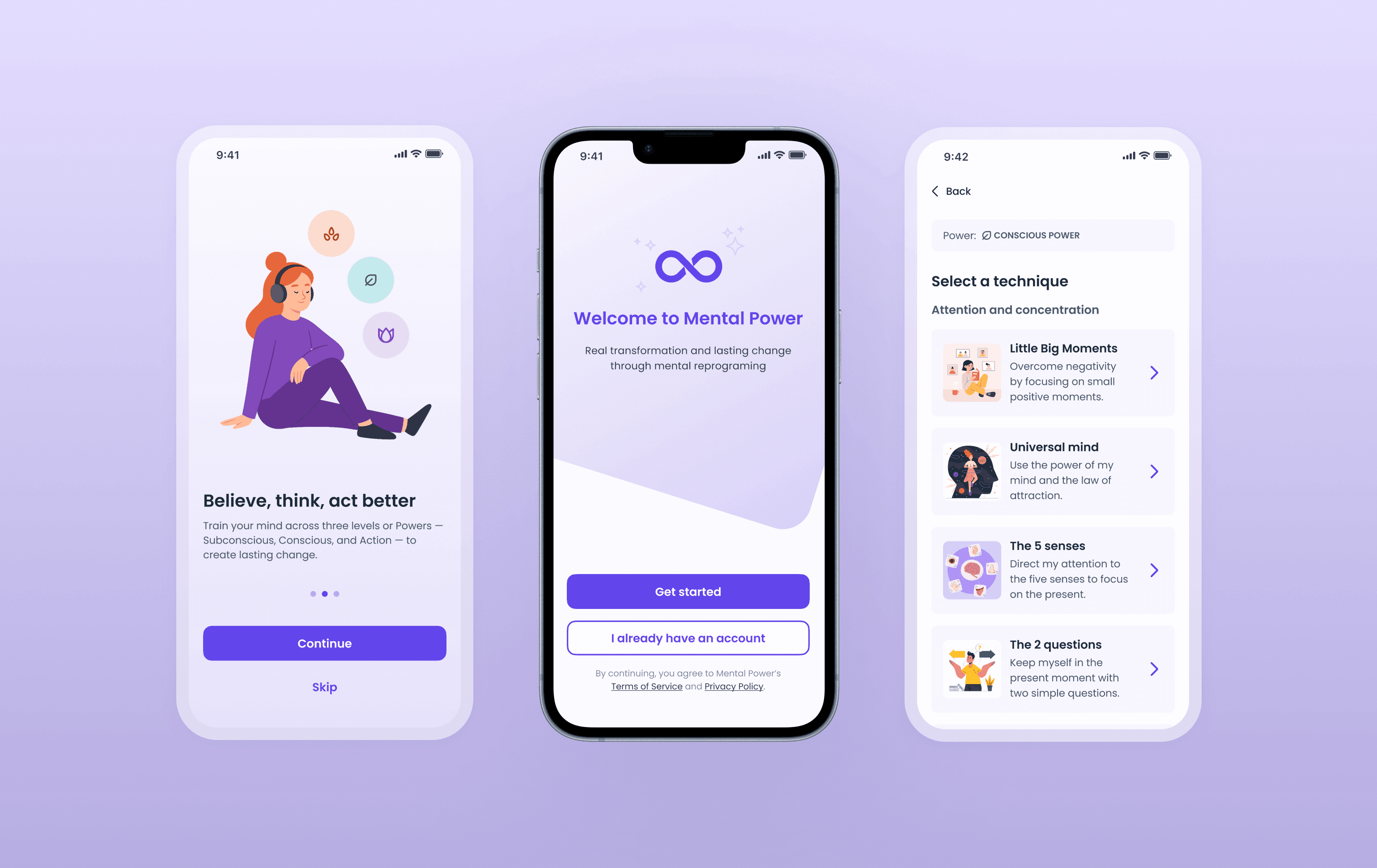
Four mobile screens showing the redesigned onboarding flow of the Mental Power app, including the welcome screen, an introductory slide with illustrations, a technique selection screen, and a simplified paywall with clear pricing and a prominent call to action.

Role

Product Designer

Sole Designer

Team

1x Product Manager

3x Engineers

Impact

5× Increase in User Registrations

~2× Growth in Premium Trial Sign-Ups

250% Faster Design Delivery

Role

Product Designer

Sole Designer

Team

1x Product Manager

3x Engineers

Impact

5× Increase in User Registrations

~2× Growth in Premium Trial Sign-Ups

250% Faster Design Delivery

Role

Product Designer

Sole Designer

Team

1x Product Manager

3x Engineers

Impact

5× Increase in User Registrations

~2× Growth in Premium Trial Sign-Ups

250% Faster Design Delivery

Project under NDA

This case study is based on my experience working on Mental Power under a NDA. To respect these confidentiality constraints, all information is shared at a high level.

OVERVIEW

Mental Power, a mental wellness mobile app, showed strong initial demand at download. However, many users were leaving the onboarding flow before completing registration.

Key challenges for the team included limited visibility into where users were disengaging and the need to move quickly in a fast-paced environment.

As the sole UX/UI designer, I led a full redesign of the onboarding experience collaborating closely with stakeholders and the dev team. The redesigned flow contributed to a fivefold increase in user registrations, faster design delivery, and a more accessible experience.

Mental Power, a mental wellness mobile app, showed strong initial demand at download. However, many users were leaving the onboarding flow before completing registration.

Key challenges for the team included limited visibility into where users were disengaging and the need to move quickly in a fast-paced environment.

As the sole UX/UI designer, I led a full redesign of the onboarding experience collaborating closely with stakeholders and the dev team. The redesigned flow contributed to a fivefold increase in user registrations, faster design delivery, and a more accessible experience.

PROBLEM AREA

Downloads were high; registrations told a different story

Despite strong initial interest, many first-time users of Mental Power were dropping off during onboarding before completing registration. This suggested that while users were motivated to try the app’s mental wellness offering, friction within the onboarding flow was preventing them from creating an account, even on the free plan.

As a result, onboarding emerged as the most critical experience to redesign when I joined the team.

CHALLENGES & CONSTRAINTS

What we were working with

When I joined Mental Power, it quickly became clear that the onboarding redesign would involve navigating several constraints and challenges.

Designing under uncertainty

Limited onboarding insights made it hard to pinpoint user disengagement, so design decisions relied on UX best practices, research, and strategic judgment.

Designing under uncertainty

Limited onboarding insights made it hard to pinpoint user disengagement, so design decisions relied on UX best practices, research, and strategic judgment.

Designing under uncertainty

Limited onboarding insights made it hard to pinpoint user disengagement, so design decisions relied on UX best practices, research, and strategic judgment.

Moving fast in a rapid environment

Improvements needed to be implemented efficiently. This led to an approach that prioritized high-impact, low-effort design decisions first.

Moving fast in a rapid environment

Improvements needed to be implemented efficiently. This led to an approach that prioritized high-impact, low-effort design decisions first.

Moving fast in a rapid environment

Improvements needed to be implemented efficiently. This led to an approach that prioritized high-impact, low-effort design decisions first.

Navigating an evolving design system

An evolving design system required thoughtful decisions to improve consistency and accessibility without introducing disruptive changes.

Navigating an evolving design system

An evolving design system required thoughtful decisions to improve consistency and accessibility without introducing disruptive changes.

Navigating an evolving design system

An evolving design system required thoughtful decisions to improve consistency and accessibility without introducing disruptive changes.

Communicating complexity with care

The onboarding needed to communicate complex mental wellness concepts clearly while also creating a supportive experience rather than adding pressure.

Communicating complexity with care

The onboarding needed to communicate complex mental wellness concepts clearly while also creating a supportive experience rather than adding pressure.

Communicating complexity with care

The onboarding needed to communicate complex mental wellness concepts clearly while also creating a supportive experience rather than adding pressure.

FIRST STEPS

When one screen wasn’t enough

Action was needed quickly.

While it was clear that the onboarding experience required a deeper, more holistic approach, the redesign had to start somewhere. The paywall was selected as the first screen to revisit because it offered the potential for meaningful impact with relatively low implementation effort. It was also a critical decision point in the flow, where users were asked to choose between different paid plans, making it a likely source of friction.

Paywall redesign
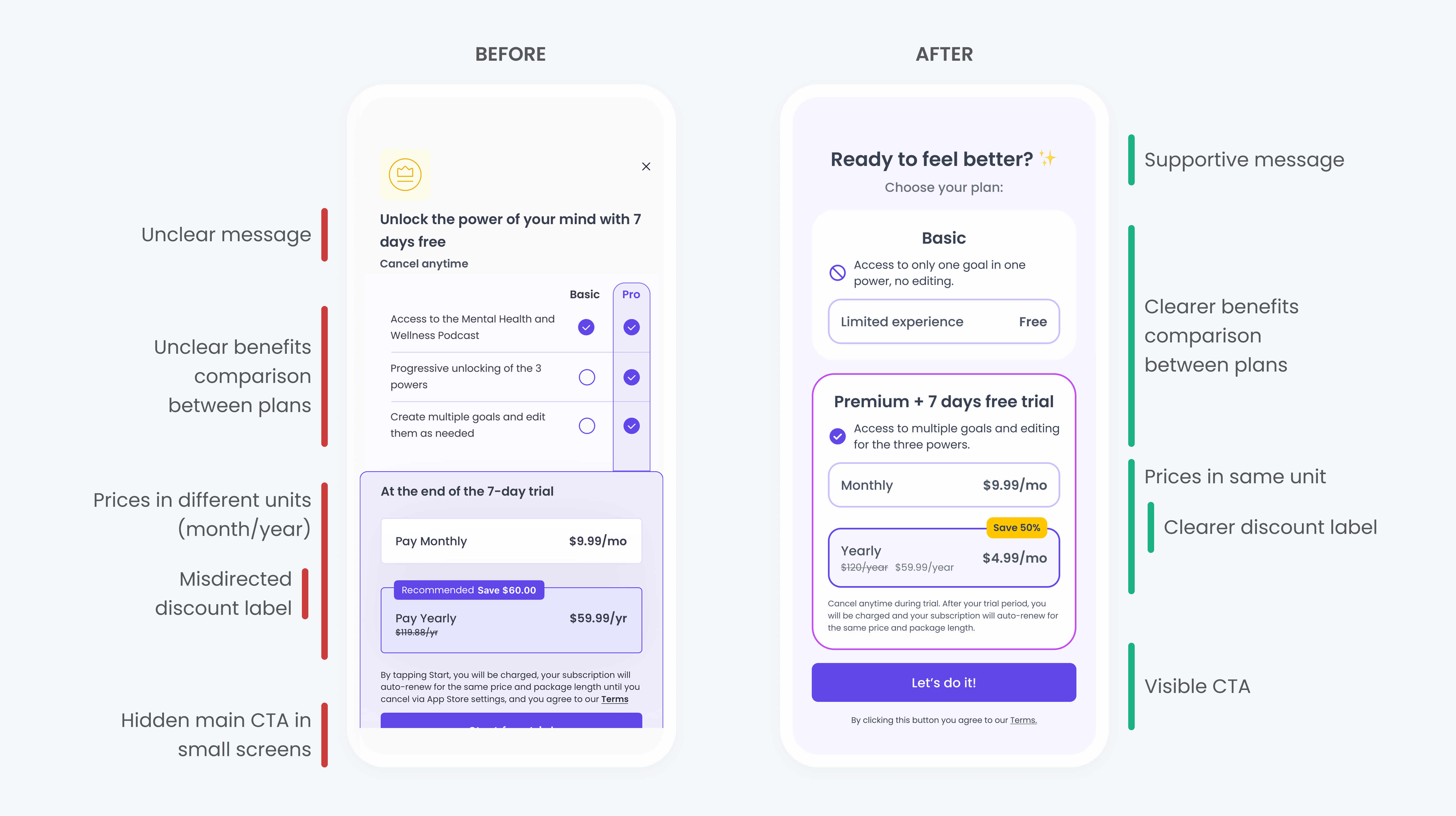
Side-by-side comparison of the Mental Power paywall before and after redesign. The original version shows unclear messaging, inconsistent pricing units, and a hidden primary CTA, while the redesigned version presents supportive, benefit-driven messaging, clearer plan comparison with consistent pricing, visible discounts, and a prominent call to action.

Clear, benefit-driven messaging

Jargon-heavy language was replaced with clear and supportive messaging.

Clear, benefit-driven messaging

Jargon-heavy language was replaced with clear and supportive messaging.

Clear, benefit-driven messaging

Jargon-heavy language was replaced with clear and supportive messaging.

Simplified pricing & decision-making

Plans were restructured to allow easy comparison, and a visible primary CTA.

Simplified pricing & decision-making

Plans were restructured to allow easy comparison, and a visible primary CTA.

Simplified pricing & decision-making

Plans were restructured to allow easy comparison, and a visible primary CTA.

However, this change alone wasn’t enough.

Although the paywall redesign improved clarity at a screen level, it did not significantly change registration outcomes on its own. These results reinforced the hypothesis that the issue extended beyond a single screen and highlighted the need to evaluate the onboarding experience more holistically.

ANALYSIS

So, where were users dropping off?

The paywall redesign showed the issue was bigger than one screen. It was time to zoom out and look at the experience as a whole.

To better understand where friction might be occurring, I reviewed the full onboarding flow and broke it down into its key stages. While I was not responsible for defining the overall order of the flow, my role focused on analyzing each section to identify friction, cognitive overload, and moments of confusion that could impact completion.

Onboarding flow before redesign

Diagram showing the Mental Power onboarding flow steps in sequence: onboarding screen, introductory carousel, selection step, sign-in and sign-up, routine creation, and paywall.

Once the full flow was mapped out, it was time to take a closer look at each section.

Connecting the dots

Without clear indicators showing exactly where friction was occurring, I explored additional ways to better understand the challenges that users could be facing during the onboarding.

Before proposing design changes, I evaluated the onboarding experience using UX heuristics as a reference and complemented this analysis with feedback gathered through a user survey. This approach helped me find several critical issues that could be affecting the onboarding completion.

Onboarding screens before redesign
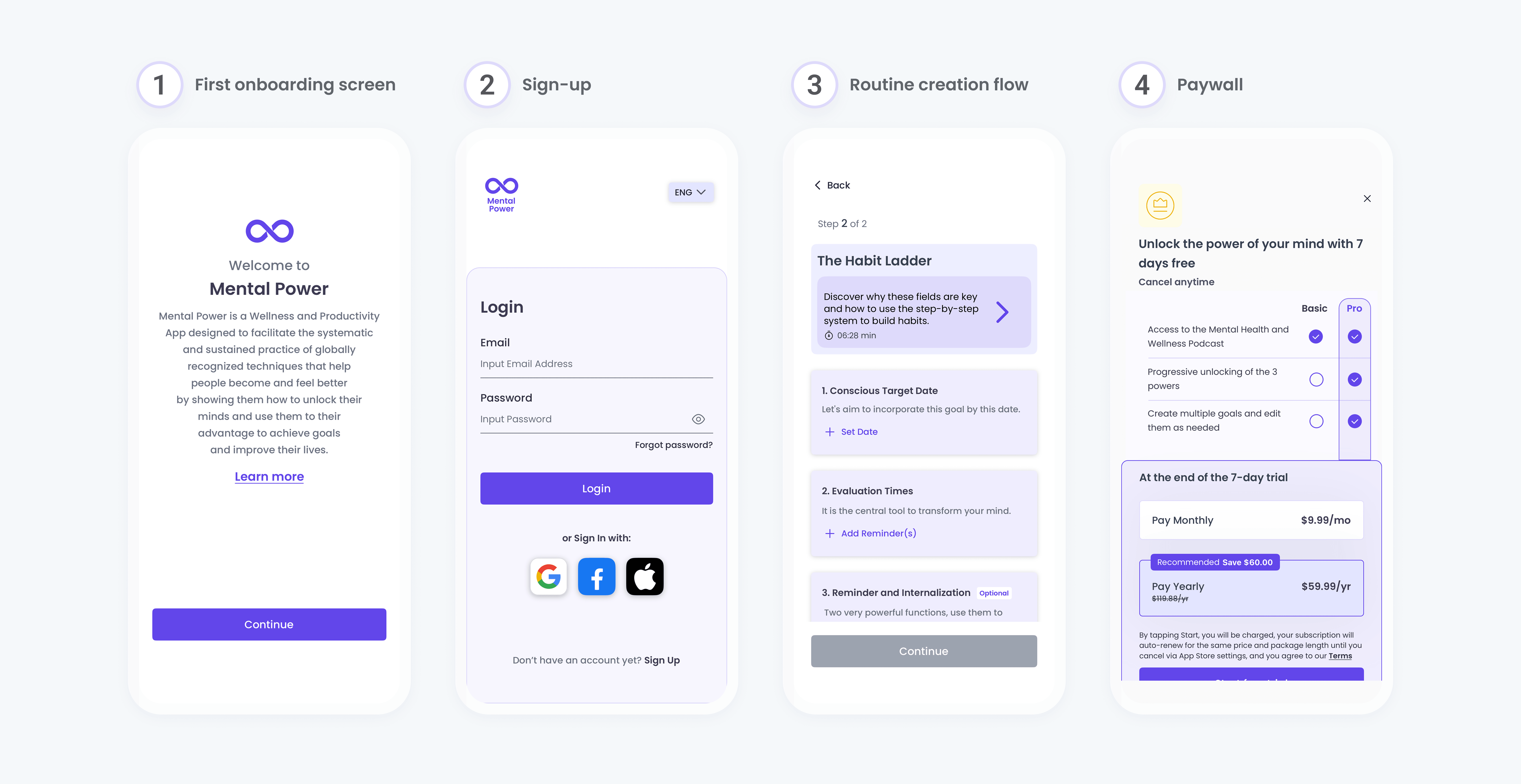
Overview of the original Mental Power onboarding flow, showing four key steps: the first onboarding screen with a text-heavy introduction, a login-focused sign-up screen, a complex routine creation flow with multiple inputs, and a paywall with unclear messaging and pricing presentation.

1. Value lost in jargon

Introductory screens focused heavily on internal terminology rather than user motivations or needs.

1. Value lost in jargon

Introductory screens focused heavily on internal terminology rather than user motivations or needs.

1. Value lost in jargon

Introductory screens focused heavily on internal terminology rather than user motivations or needs.

2. Confusing entry point

Registration was presented through a login-style screen, which could confuse first-time users trying to create an account.

2. Confusing entry point

Registration was presented through a login-style screen, which could confuse first-time users trying to create an account.

2. Confusing entry point

Registration was presented through a login-style screen, which could confuse first-time users trying to create an account.

3. High cognitive load

Routine creation introduced a high volume of information across multiple steps, increasing cognitive load.

3. High cognitive load

Routine creation introduced a high volume of information across multiple steps, increasing cognitive load.

3. High cognitive load

Routine creation introduced a high volume of information across multiple steps, increasing cognitive load.

4. Unclear upgrade value

Paywall (prior to its redesign) relied heavily on text and did not clearly communicate the benefits of upgrading.

4. Unclear upgrade value

Paywall (prior to its redesign) relied heavily on text and did not clearly communicate the benefits of upgrading.

4. Unclear upgrade value

Paywall (prior to its redesign) relied heavily on text and did not clearly communicate the benefits of upgrading.

Feedback from a user survey supported several of the issues identified during the onboarding analysis.

While onboarding length was generally not perceived as a problem, users reported difficulty understanding the app’s core benefits and how it could support them. Although this feedback was memory-based and not statistically significant, it provided valuable insight that guided the redesign.

Before addressing the entire experience, one simple yet critical flow needed immediate attention: the sign-up and sign-in experience.

DECISION 01

Small changes for a greater impact

At this stage of the redesign, one thing became clear: if users couldn’t create an account easily, nothing else in the onboarding flow would matter.

To address this, I focused on simplifying the sign-up and log-in experience as one of the earliest and most critical moments in onboarding. New users were initially presented with a login-first screen, which could create confusion and unnecessary friction. The goal was to design an account creation experience that felt intuitive for first-time users while still efficiently supporting returning users.

This also represented a quick-win opportunity, as the experience could be improved with minimal development effort.

Sign-up redesign
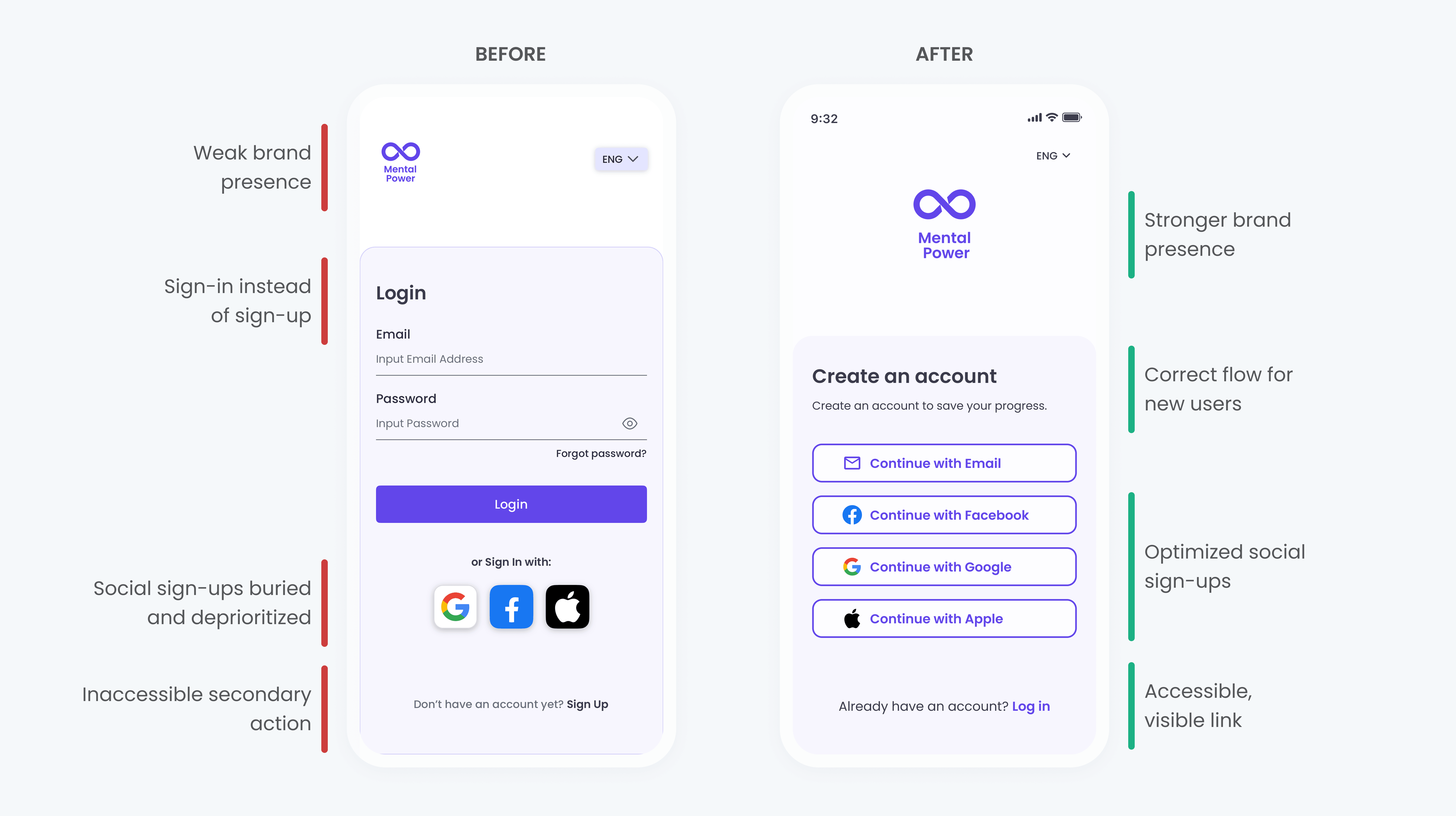
Overview of the original Mental Power onboarding flow, showing four key steps: the first onboarding screen with a text-heavy introduction, a login-focused sign-up screen, a complex routine creation flow with multiple inputs, and a paywall with unclear messaging and pricing presentation.

Clarified the primary path for new users

A “Sign in” screen could confuse new users, so the flow was redesigned to prioritize account creation.

Clarified the primary path for new users

A “Sign in” screen could confuse new users, so the flow was redesigned to prioritize account creation.

Clarified the primary path for new users

A “Sign in” screen could confuse new users, so the flow was redesigned to prioritize account creation.

Optimized social sign-up to reduce friction

Fast sign-up options (Google, Apple, and Facebook) were prioritized to reduce effort during registration.

Optimized social sign-up to reduce friction

Fast sign-up options (Google, Apple, and Facebook) were prioritized to reduce effort during registration.

Optimized social sign-up to reduce friction

Fast sign-up options (Google, Apple, and Facebook) were prioritized to reduce effort during registration.

Sign-up with email redesign
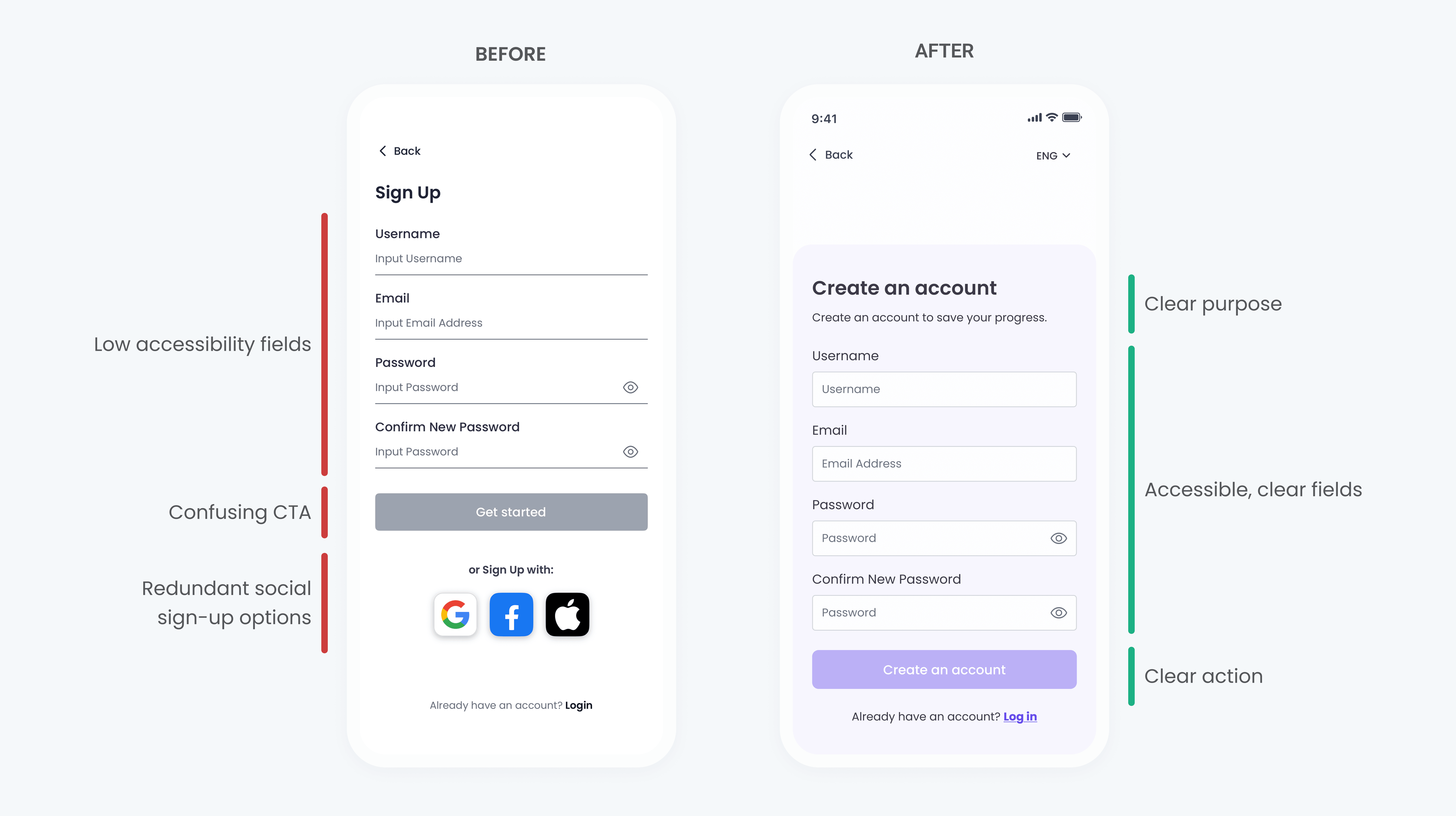
Side-by-side comparison of the Mental Power account creation screen before and after redesign. The original version used underlined text fields, while the redesigned screen uses outlined input fields to improve readability, accessibility, and form clarity, with a clearer primary action for account creation.

Improved form accessibility and clarity

Underlined text fields were replaced with outlined text fields to create clearer visual boundaries, improve readability, and increase touch accuracy, supporting accessibility and usability best practices.

Improved form accessibility and clarity

Underlined text fields were replaced with outlined text fields to create clearer visual boundaries, improve readability, and increase touch accuracy, supporting accessibility and usability best practices.

Improved form accessibility and clarity

Underlined text fields were replaced with outlined text fields to create clearer visual boundaries, improve readability, and increase touch accuracy, supporting accessibility and usability best practices.

First screen redesign
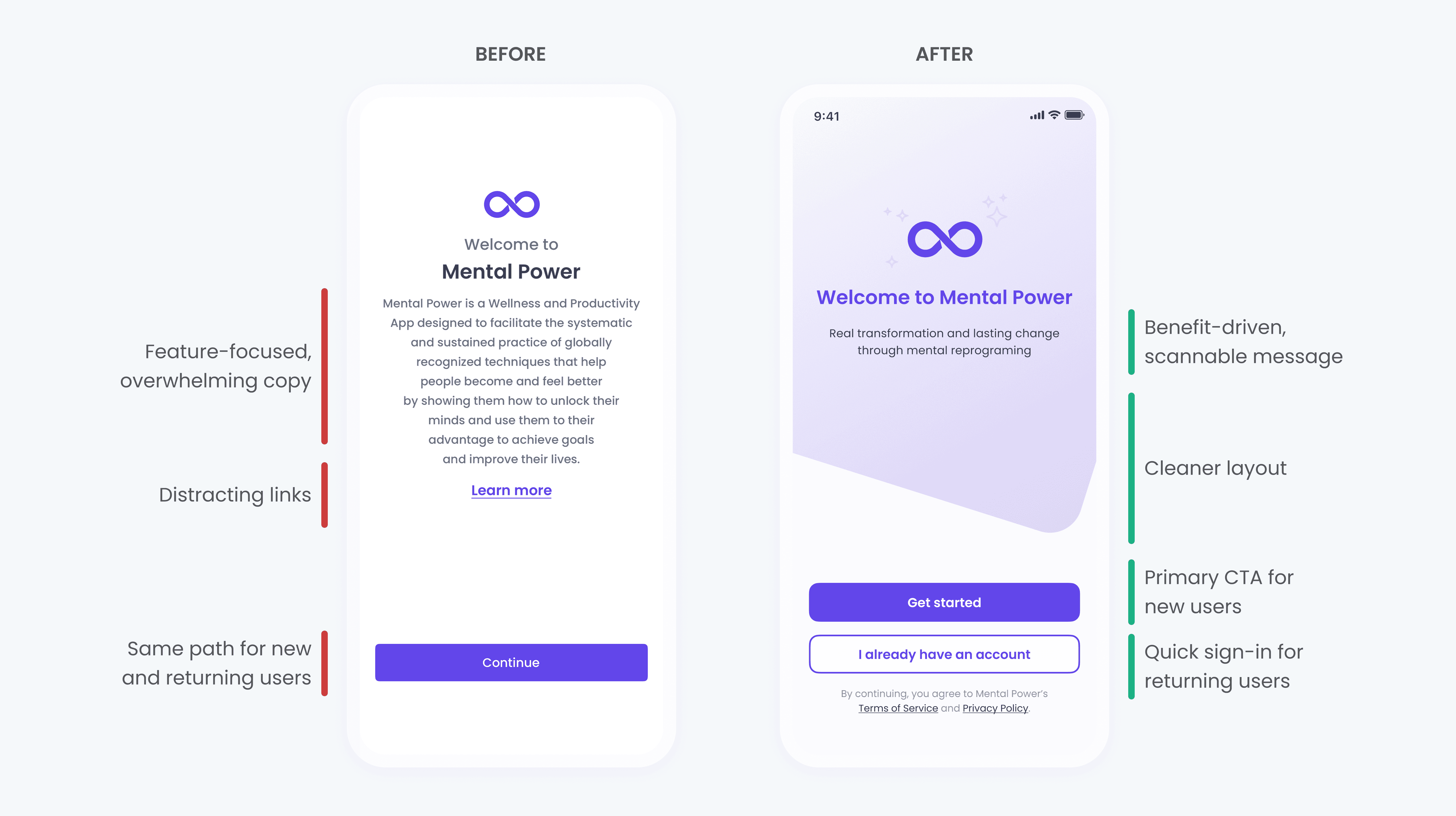
Side-by-side comparison of the Mental Power account creation screen before and after redesign. The original version used underlined text fields, while the redesigned screen uses outlined input fields to improve readability, accessibility, and form clarity, with a clearer primary action for account creation.

Reduced friction for returning users

To avoid frustration for users who already had an account, I proposed adding a quick sign-in option directly on the first screen, allowing returning users to bypass unnecessary steps.

Reduced friction for returning users

To avoid frustration for users who already had an account, I proposed adding a quick sign-in option directly on the first screen, allowing returning users to bypass unnecessary steps.

Reduced friction for returning users

To avoid frustration for users who already had an account, I proposed adding a quick sign-in option directly on the first screen, allowing returning users to bypass unnecessary steps.

With the most critical but relatively simple flows addressed, the focus could then shift to more complex onboarding challenges.

DECISION 02

Less explaining, more guiding

During onboarding, users were expected to do much of the cognitive work themselves, mapping their personal challenges to the correct tools, when the product could have provided more guidance.

As part of the onboarding analysis, I explored an alternative approach focused on helping users discover the most relevant techniques based on their needs. The existing experience required first-time users to understand internal concepts and decide which “Power” or technique applied to them. This proposal aimed to reduce that effort by starting with the user’s goals and challenges, and then guiding them toward appropriate tools.

Although this concept was not developed further, it helped me reinforce the importance of minimizing cognitive load and providing clearer guidance during the routine creation.

Current approach
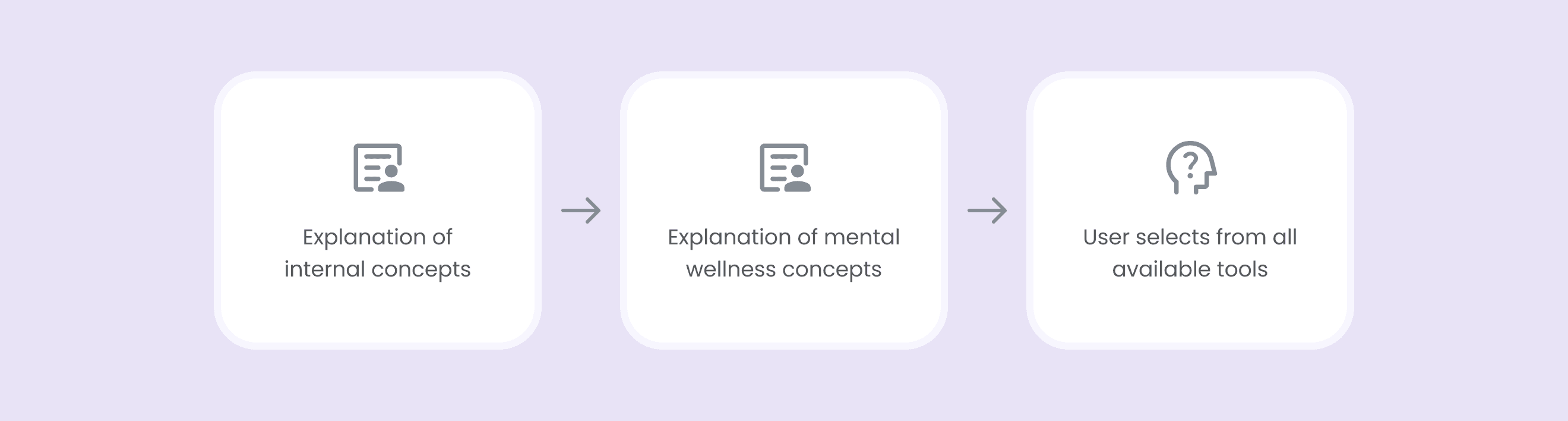
Diagram illustrating the original onboarding approach, where users are first shown explanations of internal and mental wellness concepts before being asked to choose from all available tools, placing the burden of decision-making on the user early in the flow.

Conceptual proposal

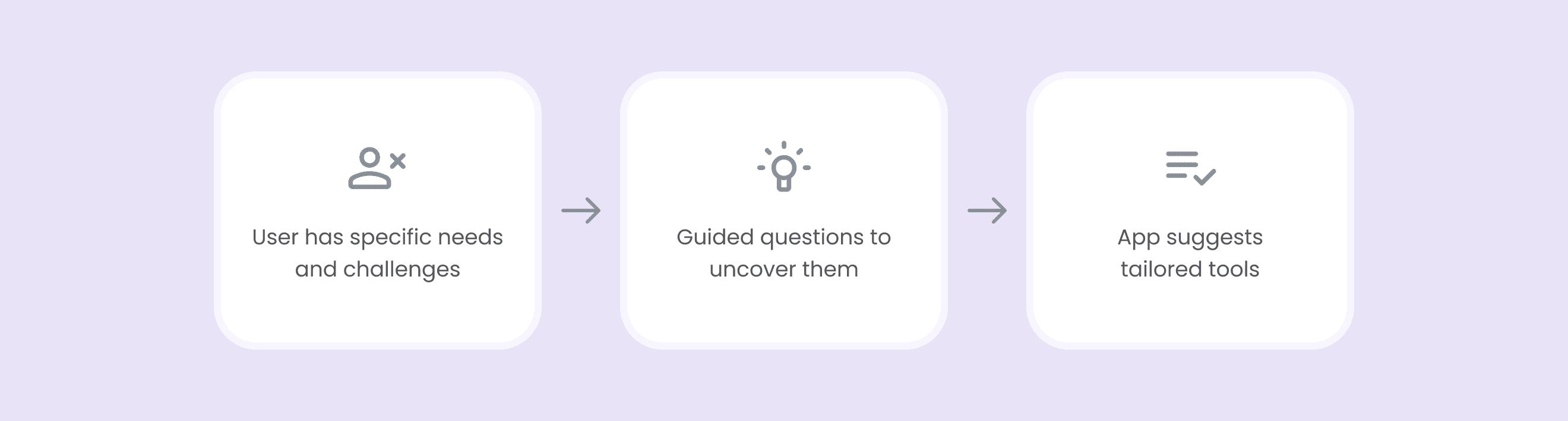
Diagram illustrating the proposed onboarding approach, where the user’s needs and challenges are identified through guided questions, allowing the app to suggest tailored mental wellness tools instead of requiring users to choose on their own.

DECISION 03

One concept at a time

Routine creation is a core moment in the Mental Power experience, yet it had the potential to overwhelm users during onboarding.

Routine creation allows users to build habits across three levels, or “Powers,” each focused on a different aspect of wellbeing. In the original flow, new users were asked to read long blocks of text while simultaneously making choices, such as selecting a technique or setting a target date.

Routine creation before redesign
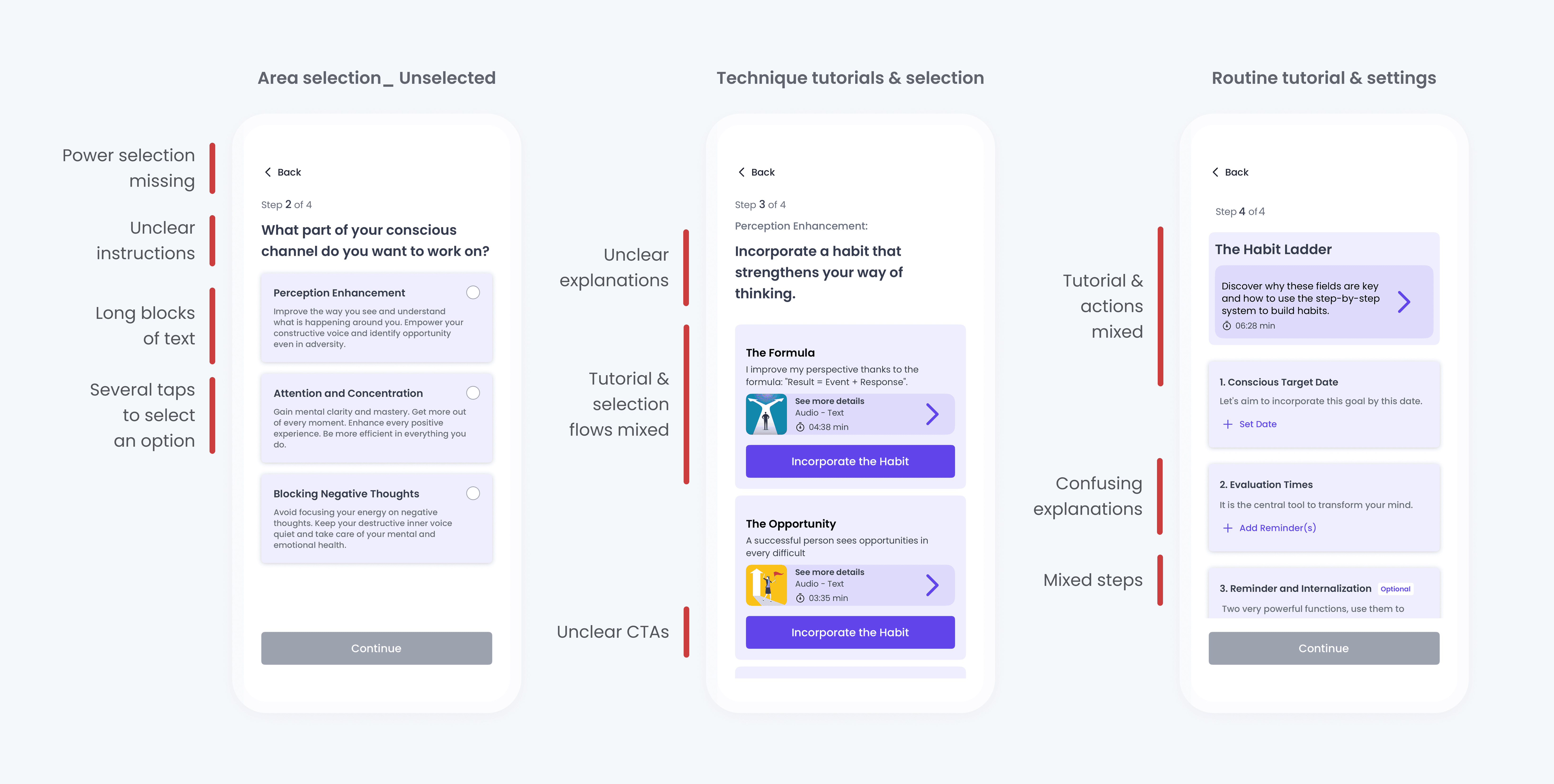
Annotated screens from the routine creation flow highlighting usability issues, including unclear instructions, long blocks of text, mixed tutorial and action steps, unclear CTAs, and increased cognitive load during selection and setup.

Despite these challenges, I intentionally proposed keeping the routine creation as part of the onboarding.

This decision was informed by both user feedback (they didn't find the onboarding too long) and design principles (completing a task during onboarding could create a sense of progress and commitment that could increase engagement).

To improve clarity and reduce mental effort, I redesigned the flow using a “one concept at a time” approach.

Routine creation after redesign
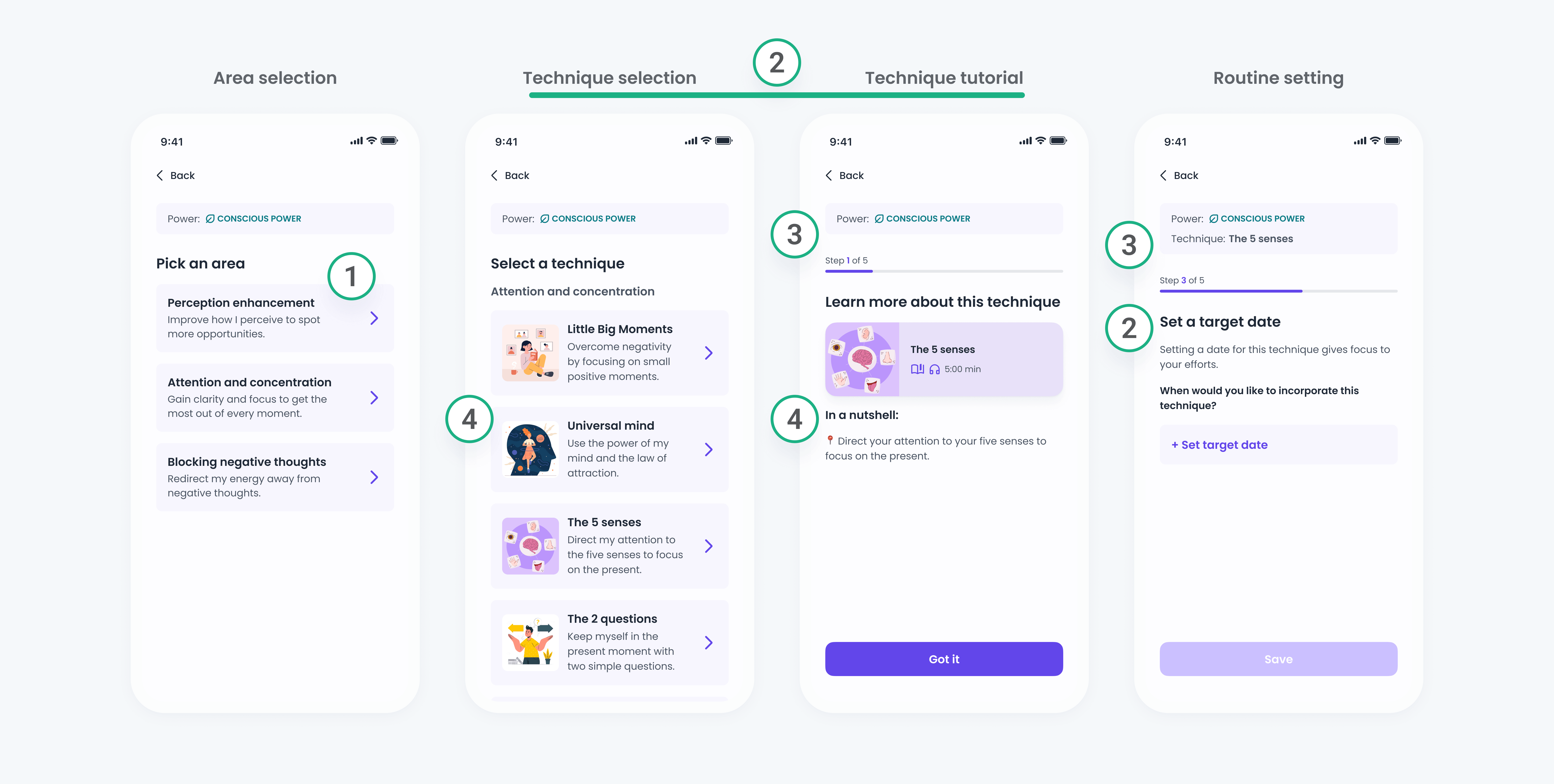
Redesigned routine creation flow showing a step-by-step structure with area selection, technique selection, focused tutorials, and routine settings, highlighting clearer hierarchy, guided progression, and reduced cognitive load.

1. Streamlined interactions

Removed unnecessary buttons and enabled progression after each selection, reducing friction.

1. Streamlined interactions

Removed unnecessary buttons and enabled progression after each selection, reducing friction.

1. Streamlined interactions

Removed unnecessary buttons and enabled progression after each selection, reducing friction.

2. Reduced cognitive load

Separated actions and tutorials, so users can concentrate on one decision at a time per screen.

2. Reduced cognitive load

Separated actions and tutorials, so users can concentrate on one decision at a time per screen.

2. Reduced cognitive load

Separated actions and tutorials, so users can concentrate on one decision at a time per screen.

3. Improved orientation and progress visibility

Added contextual reminders and a stepper to help users stay oriented and motivated.

3. Improved orientation and progress visibility

Added contextual reminders and a stepper to help users stay oriented and motivated.

3. Improved orientation and progress visibility

Added contextual reminders and a stepper to help users stay oriented and motivated.

4. Simplified explanations

Rewrote explanations to be easier to understand, providing support without overwhelming users.

4. Simplified explanations

Rewrote explanations to be easier to understand, providing support without overwhelming users.

4. Simplified explanations

Rewrote explanations to be easier to understand, providing support without overwhelming users.

While simplifying routine creation could help users take action, the onboarding still needed to do a better job of setting expectations and communicating value earlier on.

DECISION 04

Because first impressions matter

To close the first iteration of the onboarding redesign, I went back to where the experience begins: the first screen and the onboarding carousel.

After assessing and improving the most critical flows, it became clear that the onboarding still needed a better opening. I redesigned the first screens with the same goals of clarity and user-centered thinking, knowing this initial moment would shape how users understood the app and whether they felt confident continuing.

Clarifying the first onboarding screen

BEFORE
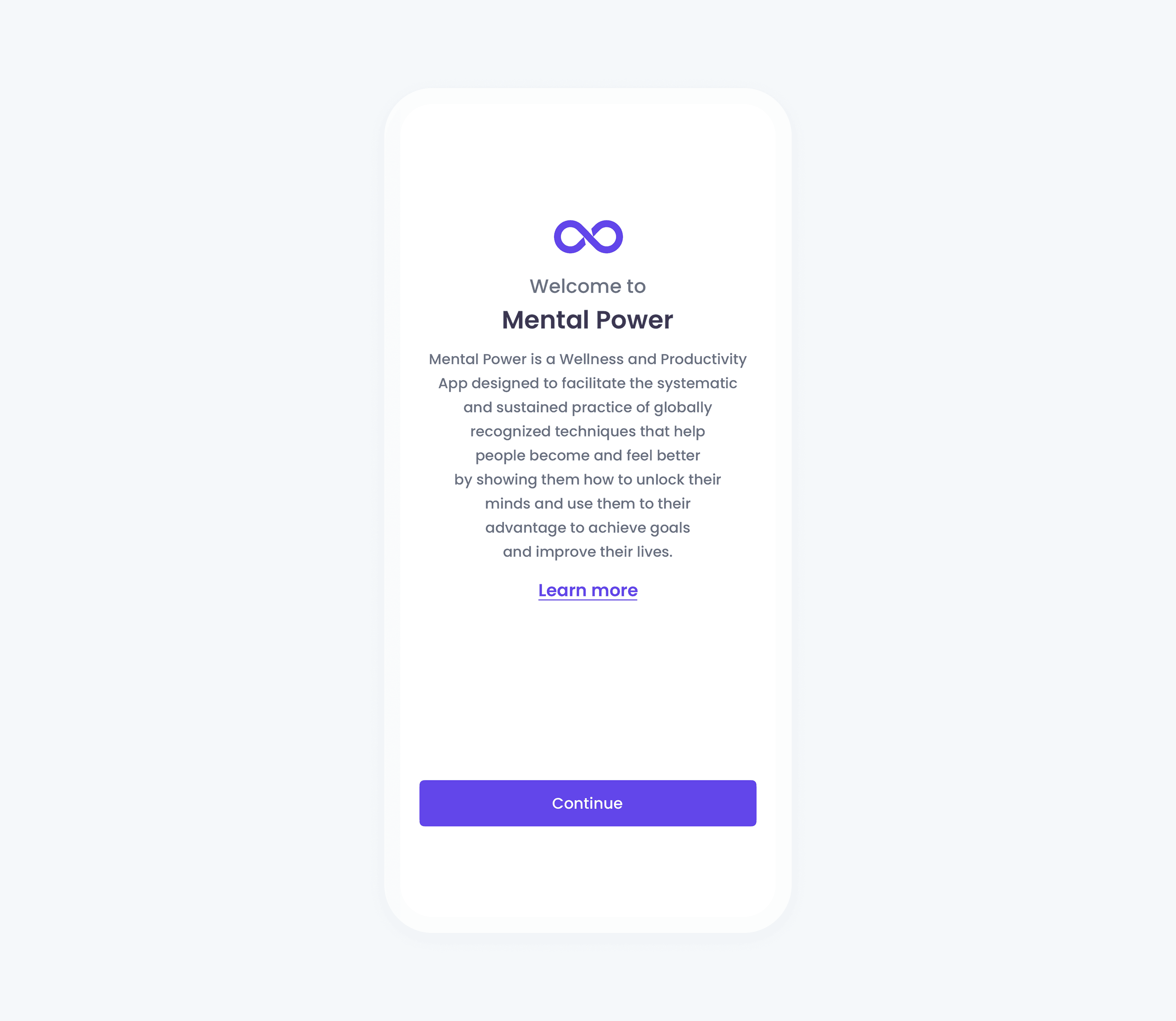
Original Mental Power onboarding welcome screen with a long descriptive paragraph explaining the app’s concepts, a “Learn more” link, and a primary “Continue” button, creating a dense and text-heavy first impression.

Before: Overwhelming unclear message

The first screen relied on dense text, and early explanations of internal concepts, making it hard for users to quickly understand the app’s value.

Before: Overwhelming unclear message

The first screen relied on dense text, and early explanations of internal concepts, making it hard for users to quickly understand the app’s value.

Before: Overwhelming unclear message

The first screen relied on dense text, and early explanations of internal concepts, making it hard for users to quickly understand the app’s value.

AFTER
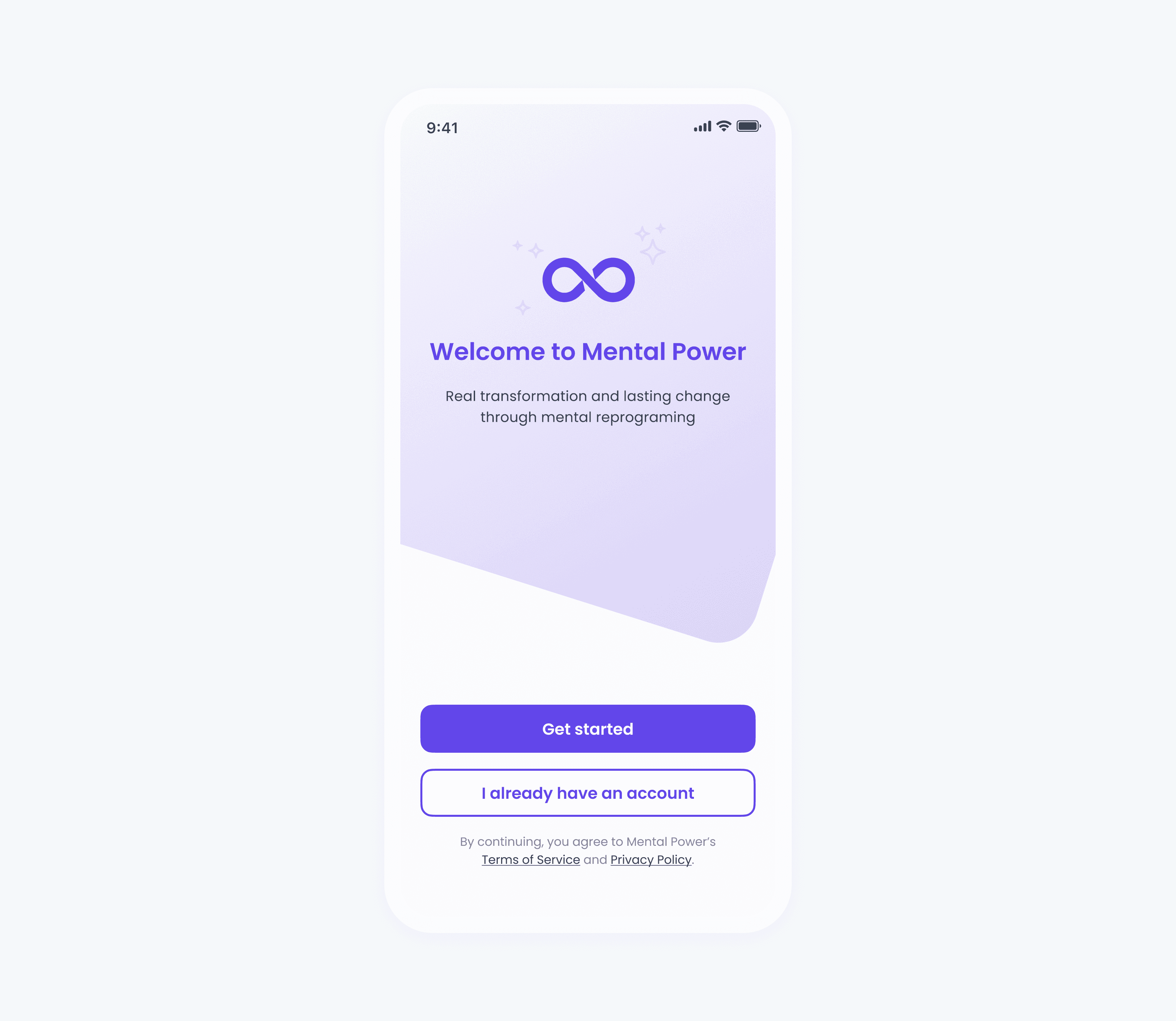
Redesigned Mental Power onboarding welcome screen with a short, benefit-driven message, calming visual background, and clear primary actions: “Get started” for new users and “I already have an account” for returning users, creating a clearer and more supportive first impression.

After: Clear, benefit-driven message

The screen was redesigned around the user’s core pain point, with a clear, benefit-driven message that explains how the app can help.

After: Clear, benefit-driven message

The screen was redesigned around the user’s core pain point, with a clear, benefit-driven message that explains how the app can help.

After: Clear, benefit-driven message

The screen was redesigned around the user’s core pain point, with a clear, benefit-driven message that explains how the app can help.

Simplifying the onboarding carousel

BEFORE AND AFTER

Before: Abstract and text-heavy

The onboarding carousel relied on long paragraphs and emotionally intense language to explain internal concepts, overwhelming users early in the experience.

Before: Abstract and text-heavy

The onboarding carousel relied on long paragraphs and emotionally intense language to explain internal concepts, overwhelming users early in the experience.

Before: Abstract and text-heavy

The onboarding carousel relied on long paragraphs and emotionally intense language to explain internal concepts, overwhelming users early in the experience.

After: Clear and reassuring

Messages became benefit-driven, content was structured as one idea per screen, and AI-generated illustrations helped the experience feel more approachable.

After: Clear and reassuring

Messages became benefit-driven, content was structured as one idea per screen, and AI-generated illustrations helped the experience feel more approachable.

After: Clear and reassuring

Messages became benefit-driven, content was structured as one idea per screen, and AI-generated illustrations helped the experience feel more approachable.

Together, these changes created a clearer, more empathetic first interaction that helped motivate users to continue through the rest of the onboarding flow.

RETROSPECTIVE

Let’s talk numbers

Following the onboarding redesign, the experience showed clear improvements:

5× increase

In user registrations during onboarding

5× increase

In user registrations during onboarding

5× increase

In user registrations during onboarding

~2× growth

In premium trial sign-ups

~2× growth

In premium trial sign-ups

~2× growth

In premium trial sign-ups

250% faster design iteration

after introducing a UI kit and reusable component library

250% faster design iteration

after introducing a UI kit and reusable component library

250% faster design iteration

after introducing a UI kit and reusable component library

But that isn’t all

Looking back, the impact of this project went beyond numbers.

Leading the full redesign of Mental Power’s onboarding was an amazing experience, not only because it helped me improve my design skills but because it taught me the importance of close collaboration, strategic prioritization and how optimized workflows can not only save time for the company but improve user engagement.

Looking ahead, potential next steps in my opinion would be introducing more granular onboarding measurement, validating the redesign through usability testing, and experimenting with onboarding variations to further improve activation and trial conversion. In parallel, the UI kit could evolve into a lightweight design system to better support scale and consistency.

“She brings a strong UX mindset, combining research, analysis, and clear reasoning to make thoughtful decisions that truly improve the user experience. Her work on the redesign significantly improved the structure, clarity, and overall quality of the app.”

“She brings a strong UX mindset, combining research, analysis, and clear reasoning to make thoughtful decisions that truly improve the user experience. Her work on the redesign significantly improved the structure, clarity, and overall quality of the app.”

“She brings a strong UX mindset, combining research, analysis, and clear reasoning to make thoughtful decisions that truly improve the user experience. Her work on the redesign significantly improved the structure, clarity, and overall quality of the app.”